More benefits.
More flex.
More NOW.
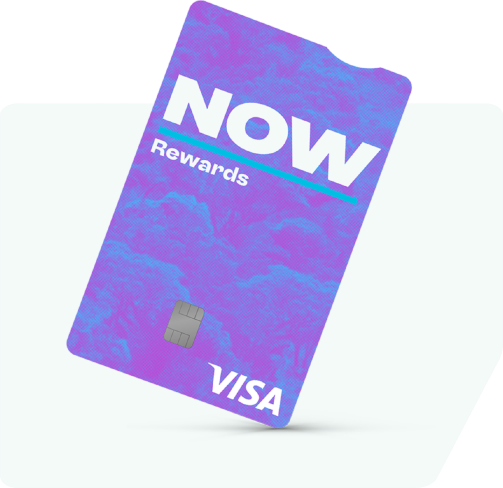
Say hello to NOW Rewards Visa!
Exciting news – your Purple Visa Card is getting an upgrade.
From early May, it will become NOW Rewards Visa. You’ll enjoy the same great features and benefits you love, now wrapped in a fresh new look and feel. Even better, NOW Rewards Visa will offer the added convenience of digital wallet capability, starting with Google Wallet™.
If you have a Purple Visa Card and you are eligible, you will receive a new NOW Rewards Visa soon^. Read below to find out all you need to know, including some common questions about the change.
^Subject to your Card Account status at time of issue. If you haven’t received your card by the end of June 2026, please email us at update@NOWvisa.co.nz.
Earn rewards
Pay now and earn NOW Dollars on your everyday Visa spend*. Every time you spend NZ$150 on Eligible Transactions you’ll earn 1 NOW Dollar. 1 NOW Dollar = $1 NZ Dollar.
Interest free deals
Bring your big plans to life. Whether it’s that shiny new big‑screen TV or a few extra upgrades for your car, long‑term interest free* plans make it easy — spreading your costs over 6–60 months at Participating Retailers so you can enjoy more NOW.

More NOW
Spend your NOW Dollars or save them for something special. You can redeem them online or in store at Participating Retailers.
NOW with Digital Wallet
Your new NOW Rewards Visa comes with the convenience of digital wallet, with Google Wallet™ available initially. Use Google Pay™ to speed through checkouts with just a click or a tap whenever that NOW moment strikes.

What do you need to do?
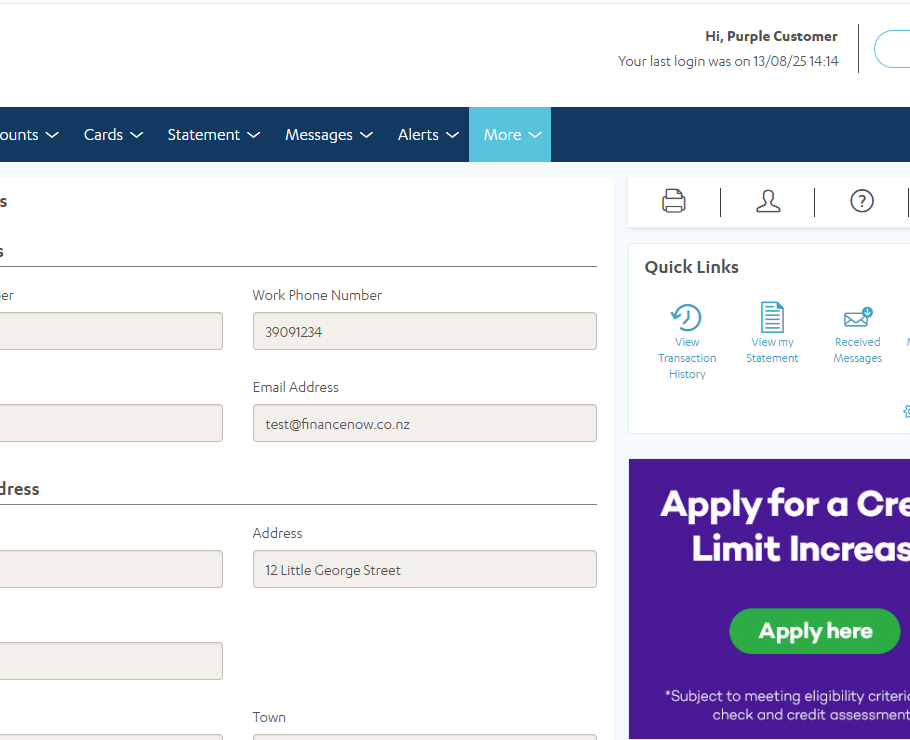
For now, simply log in to eMoney.co.nz for Purple Visa Card and check that your mailing address is up to date, to ensure your new NOW Rewards Visa arrives safely in your letterbox soon. See below for instructions.
Other than that, you don’t need to do anything – your Purple Visa Card will work right up until you activate your new NOW Rewards Visa, so you can continue to enjoy all the benefits the card has to offer.
How to check and update your mailing address
- Log in to eMoney.co.nz. If it is your first time logging in to eMoney, click ‘First time login’ and follow the prompts.
- To check you mailing address details, navigate to ‘More’ drop down selection and select ‘Your address and contact details’.
If anything needs updating, please send us an email to update@NOWvisa.co.nz with your customer number and the correct details and we’ll sort it for you.
Got questions we haven't covered?
Drop us an email to update@NOWvisa.co.nz and we’ll get back to you as soon as we can.
Frequently asked questions
General
From May 2026, Purple Visa Card will become NOW Rewards Visa, aligning with the Finance Now brand you already know and trust. Everything you love remains unchanged:
- Rewards earned on everyday Visa spend
- Long-term interest free options at Participating Retailers
- Auto 12 months interest free at Participating Retailers
- The ability to redeem rewards at Participating Retailers
Plus, we are adding the flexibility of digital wallet to help provide a more seamless payment experience, with Google Wallet™ available initially.
That’s correct. We’re simply replacing your current Purple Visa Card with a NOW Rewards Visa card. All your account and customer information, including your card number and PIN, balance, credit limit, Purple Dollars (now called NOW Dollars) will remain the same – essentially as if you requested a replacement card.
Your NOW Rewards Visa provides you with the same benefits and service you love. These benefits include:
- Rewards earned on everyday Visa spend
- Long-term interest free options at Participating Retailers
- Auto 12 months interest free at Participating Retailers
- The ability to redeem rewards at Participating Retailers
We will start reissuing all our eligible Purple Visa Card customers with a NOW Rewards Visa soon.
Just ensure your mailing address is up to date by logging in to eMoney.co.nz for Purple Visa Card. If it is your first time logging in to eMoney, click ‘First time login’ and follow the prompts.
If any details need updating, please send us an email to update@NOWvisa.co.nz with the correct details and we’ll sort it for you.
Your NOW Rewards Visa will be making its way to you very soon. If you haven’t received your new NOW Rewards Visa by the end of June, this could be due to several reasons, such as:
- Your Purple Visa Card may not be active (for example, if it was lost, stolen, or blocked),
- We haven’t been able to verify your contact details,
- Your Card Account is overdue, or
- Other factors affecting your account.
If you wish to discuss your current Card Account, please email us at update@NOWvisa.co.nz or call 0800 801 808.
Your Purple Visa Card will continue to work until you activate your new card, so you can continue to shop and earn Purple Dollars and make the most of long-term interest free deals.
Simply log in to eMoney.co.nz for Purple Visa Card and check that your mailing address is up to date. If it is your first time logging in to eMoney, click ‘First time login’ and follow the prompts.
If any details need updating, please send us an email to update@NOWvisa.co.nz with the correct details and we’ll sort it for you.
No, your payment information to us will remain the same, because your existing Card Account information doesn’t change. Which is:
- Particulars: This is your account number
- Code: This is your last name and initials
- Reference: This is your 9-digit customer number.
Once you’ve successfully activated your NOW Rewards Visa, please cut your Purple Visa Card in half (especially the chip) and dispose of it securely. If you have any direct debits and bill payments set up you will need to update them with the new expiry date and CVV number which can be found on the back of your NOW Rewards Visa.
Simply complete and submit a credit limit increase request form which you can find here – purplevisa.co.nz/cli
Once we’ve received your request, we’ll complete the review and get in touch with an outcome or ask for more information. Please note, a credit limit increase is not guaranteed.
Yes, no problem, we can send you a replacement NOW Rewards Visa card.
Simply send us an email at update@NOWvisa.co.nz with your request and we’ll action this for you. Please note, it may take up to 10 working days to receive the new card, and you may be charged a Replacement Card Fee.
Activating my new card
Yes, we want to keep your card secure, so it will arrive to you inactive. The letter with your new card will give you clear directions on how to activate. For your security, we strongly recommend you only activate the card once you physically receive it.
When you activate your new NOW Rewards Visa, your Purple Visa Card will automatically become inactive. Be sure to activate your new card as soon as you receive it, as there is a date that Purple Visa Cards will be switched off. We will let you know closer to the time when the switch off date is, if you haven’t yet activated the new card.
Simply log in to eMoney.co.nz for Purple Visa Card and check that your mailing address is up to date. If it is your first time logging in to eMoney, click ‘First time login’ and follow the prompts.
If any details need updating, please send us an email to update@NOWvisa.co.nz with the correct details and we’ll sort it for you.
Digital wallet
- Open or download the Google Wallet app from Google Play Store.
- Tap the ‘+’ sign to add a card.
- Use your phone camera to capture your card information or enter it manually.
- Follow the prompts to complete the details and tap ‘Save’ to confirm that you agree to the Google Terms and Conditions.
- Read and confirm that you agree to the NOW Rewards Visa Google Pay Terms and Conditions.
NOW Rewards
No, you will continue to enjoy all the same benefits just under a new name – NOW Rewards, earning NOW Dollars. Spend $150 and earn $1 NOW Dollar, 1 NOW Dollar = $1 NZ Dollar.
You can find out your NOW Dollars balance by:
- Logging into eMoney; or
- Emailing us at update@NOWvisa.co.nz or
- Checking your monthly statement
If you’ve earned or redeemed NOW Dollars recently, we will do our best to show an up-to-date record of your NOW Dollars on eMoney, but please allow a couple of days for this to be updated.
eMoney
If you’re having difficulty logging in, check that the information you have entered is correct and meets the following criteria:
Customer Number (found on the back of your credit card):
- It is 9 digits
- Numbers only (no letters or special characters)
Authentication Code
You should have been sent a key code to your mobile number – this will be sent to the mobile number listed on your account. If you didn’t provide us a mobile number or your number has changed, you’ll need to call us on 0800 801 808.
Password
- You can choose your own password.
- Needs to be a minimum of 8 characters and not have numbers and/or letters in consecutive order (eg. 1234 or abcd).
- Re-enter password. This must be identical to the password you have entered in the password field.
If you’re still unable to log in to eMoney please contact us on 0800 801 808.
The Legal Stuff
NOW Rewards Visa is provided by SBS Money Limited and is part of the Finance Now group of products.
*NOW Rewards Visa terms and conditions, credit criteria, rates and fees apply. NOW Dollars can be redeemed at Participating Retailers only. NOW Dollars cannot be earned or redeemed on long-term interest free purchases.
Google Wallet is a trademark of Google LLC.